forum - silicon pop culture Copyright (c) 2009 ExpressionEngine tag:https:,2009:03:20 PCGA-JR1 Drivers tag:https:,2004:/www.siliconpopculture.com/forum/viewthread/.1324 2004-05-19T14:51:22Z gr00vy0ne For those of you that have the PCGA-JR1 or JRH1 Jog-Dial Remote, I have assembled some drivers for the device that work in English. It allows you to actually see the interface and configure it a lot easier.

Driver (version 1.10.1.4)
Plug-In (ZIP version)
Plug-In (RAR version)
Jog Dial Utility (version 6.41 English in ZIP format)
Jog Dial Utility (version 6.41 English in RAR format)

Yeah, I finally got my own PCGA-JR1 and am playing around with it. It’s neat because it basically gives you two sound cards in your system. One regular one and one USB based one. Also, the MEGABASS on the PCGA-JR1 actually works.

Enjoy!

]]>
Recommend A DVD-Burner tag:https:,2009:/www.siliconpopculture.com/forum/viewthread/.7606 2009-01-22T18:31:54Z Degull1 Hi everyone.  I’ve done a bunch of reading on this site about DVD burners for my TR3.  It sounds like I can use what is called a UJ-822 and UJ-832.  I’m a little confused.  There are few different manufacturers of this drive name.  Are they all the same?  Will they all fit?  I don’t mind gutting my current dvd-rom to make room for possibly a dual layer burner.  Any ideas?

]]>
VGA-TV adaptor working? tag:https:,2008:/www.siliconpopculture.com/forum/viewthread/.7518 2008-08-13T16:13:42Z 2008-08-13T16:15:18Z DJ Hey

I bought an adaptor you can see at the attached picture. Does it work with our Intel Extreme Graphics 2 for Mobile? How? Anyone with the same question or even with an solution?

At ebay for about 3.50 Euro. A converter box will cost about $30 (ebay 230279795571).

Are you using this to watch movies or other stuff at your TV?

DJ

]]>
Maximum size Memory Stick in a TR tag:https:,2007:/www.siliconpopculture.com/forum/viewthread/.7366 2007-11-08T09:57:47Z tlvancouver I was looking at using a memory stick in my TR because I have a reader in my desktop and thought it would be an easy way to keep them “synched” but am curious if anyone knows what the maximum size the TR will be able to handle. The prices are so low that I’d like to get the largest size it can manage.

Any suggestions?

]]>
[Review]: Kensington Portable Universal Docking Station tag:https:,2004:/www.siliconpopculture.com/forum/viewthread/.1233 2004-05-09T23:32:01Z tifosiv122 In my opinion, the TR scarifies some important things in the name of mobility. One of those things is a dedicated docking station (port replicator) port. Since there is no Sony solution I went searching for a universal one.

SonyStyle sells the Kensington Portable Universal Docking Station for $129.99. Buy.com has it for around $89 shipped.

I wanted this device to plug in quickly and allow me to have use of extra ports. It delivered on one out of the two of those needs.

First, the pictures:
DSC00001.JPG
DSC00003.JPG
DSC00004.JPG
DSC00005.JPG

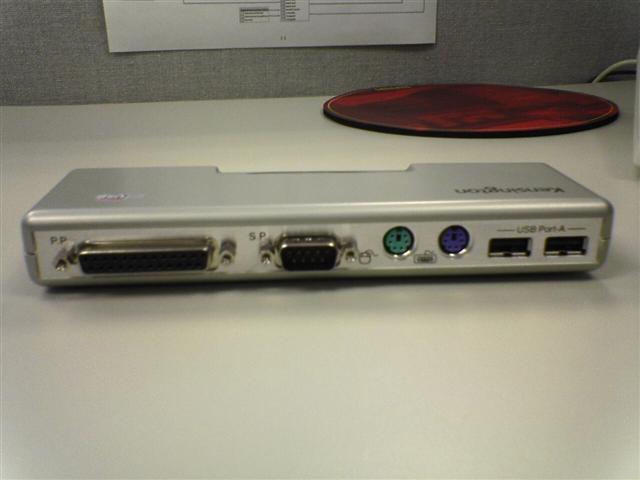
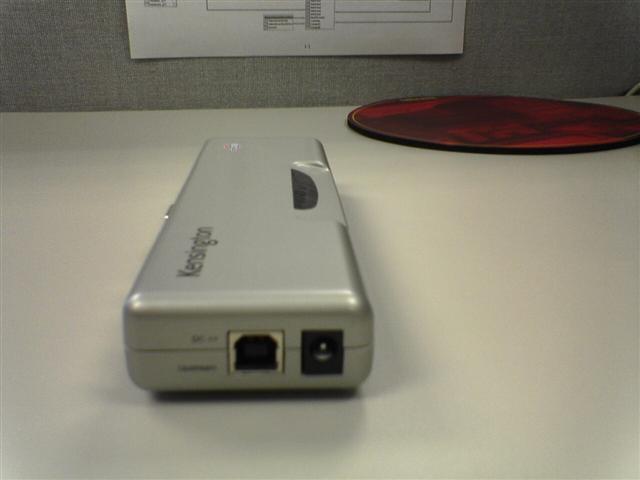
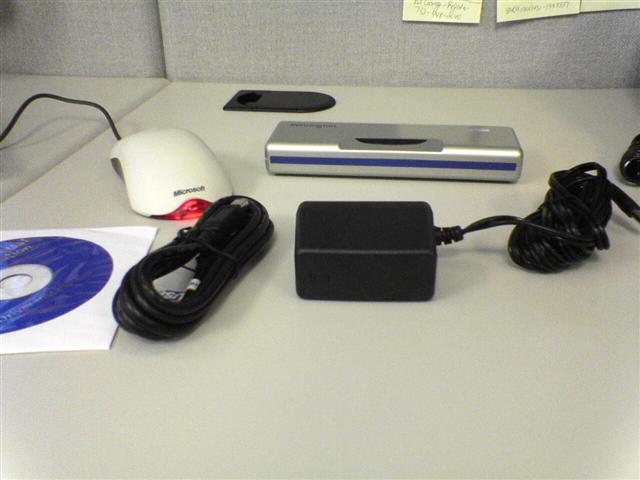
As you can see it is quite small for what it does. I used the mouse as a reference so you can really see just how compact this is. The unit came with an A/C power cord as well as a USB 2.0 Cable and the required software.

That leads me to issue #1, you need the software drivers even in XP. Not a terrible issue, I just need to make sure I know where the disc is at all times.

The ports that are included are:
1 Parallel
1 Serial
1 PS2 Mouse
1 PS2 Keyboard
2 USB Type A
1 10/100 Ethernet

I liked the idea of the 10/100 built in so when I am docking I can get off wireless. I did not have any issues with the Ethernet port interfering with either my wireless or my onboard Ethernet.

I like the idea of expanding one USB port on the TR to 2 while leaving the other onboard USB alone…giving me a total of 3 available USB ports.

I connected a printer to the Parallel port and had no issues printing. I also connected a PS2 Keyboard and Mouse and again had no issues. I also tried a USB Keyboard and Mouse, both of which worked fine. I never tested the serial port.

As I said before I had two needs, the first giving me extra ports to use, the second allowing me to quickly plug this in. Obviously I got the extra ports I needed, however one port that wasn’t included which makes my plug in and out times much slower was the lack of a VGA port. Most port replicators include this, however this one does not. Now not only do I need to plug in the docking station, but I need to plug my monitor directly into the TR…it sounds insignificant but I would have liked everything off of one cable.

I am not 100% sure why a VGA port was not included…I am not sure if it would even work through a USB port, either way I would have liked the port included if it was possible.

Overall, I still like the product, it’s not 100% perfect but it does do most of what I need. I would buy it again because it does make it easier to connect to a full keyboard and mouse and it is very compact. I’d rate it a 2 or 3 out of 5.

Thanks,
Erik

]]>
Apple Bluetooth Keyboard realizations… tag:https:,2004:/www.siliconpopculture.com/forum/viewthread/.999 2004-04-12T15:20:55Z gr00vy0ne I picked up an Apple Bluetooth keyboard tonight to try out with the TR’s internal Bluetooth. I learned a lot of interesting things.

The Good News: It works.

First of all, you have to authenticate it to get it to work. This isn’t that straightforward since there’s no apparent way to do it. Basically, you have to turn on the keyboard and immediately do a search for the device. You can use BSNE or built-in Windows Wireless Link control panel applet (which I used). You need to tell Windows to authenticate the keyboard. When it asks for the passkey, type in something short (like 4 digits). Now, type in those same digits on the Bluetooth keyboard and hit enter. You’ll have to do this blind. Upon hitting enter, the keyboard will be authenticated and start working.

The Bad News: No fix for non-working keys.

Unfortunately, TrinityWorks’ excellent Apple Keyboard Driver doesn’t work with the Bluetooth keyboard. So, that means no volume control keys, no pause/break, no scroll lock, no printscreen, and no eject CD keys. Other than that, the keyboard does work but not to its full potential. TrinityWorks is working on getting their driver to work with the Bluetooth keyboard but it’s going to take some time and more investigation.

So, if you’re thinking about this keyboard you should know that there are some limitations. Overall, it’s fairly nice keyboard with a slight redesign over the Pro Keyboard. It some ways, it’s a lot easier to clean because it no longer has the plastic covering on the top of the keyboard. You’ll need a palm rest as it doesn’t come with one. It’s powered by 4 AA batteries and Apple is nice enough to throw in 4 Titantium e2 Energizer batteries. It does also have an on/off switch on the bottom which can help save the batteries.

I’ll probably return it since I can’t use it how I want to use it. At least I now know that it does work for the most part.

]]>
Router recommendations? tag:https:,2007:/www.siliconpopculture.com/forum/viewthread/.7320 2007-09-01T15:18:34Z Swampy I’m in the market for a wireless G router for casual surfing (no gaming).
anyone have any info on where I can get the best info on these?

]]>
Waiting my Vaja case for TR ! tag:https:,2007:/www.siliconpopculture.com/forum/viewthread/.7146 2007-04-13T05:20:56Z ــــتي Q80 كــويــ Hello ,

  I ordered a Vaja case for my TR in 24th Feb and yesterday I received the tracking number .. they’ll ship it from Argentina to Kuwait with approx 6 days ..
I waited more than 40 days :evil:  although they put 25 days as the maximum deadline ! so they refunded me a $30 from the $409 that I paid for them   smile

When I receive it , I will capture some pictures for you :wink:  .

]]>
TR1MP screen electronics and keyboard needed?? tag:https:,2007:/www.siliconpopculture.com/forum/viewthread/.6948 2007-01-28T01:15:48Z zanna67 Hi, Just wondered if anyone out there could give me some advice? My newly acquired tr1mp has lines running down the lcd picture and marks across the screen, I have inherited it from a friend who dropped coke on the machine! I was surprised it still worked - but it switches on fine.
However the keyboard does not seem to function properly - i have another tr1-mp and have checked my keyboard on it, it works great with my keyboard.  Does anyone out there have any spare parts I could buy? A new keyboard and screen electronics? The screen itself doesn’t appear damaged.
Thanks for reading!
Suzanna raspberry

]]>
Router that supports SunRocket VOIP phones+ethernet+wireless tag:https:,2006:/www.siliconpopculture.com/forum/viewthread/.6890 2006-12-30T07:58:28Z Swampy Who knows of a QUALITY (No drop signal!) Router that supports a couple ethernet lines, wireless, and, at least one VOIP line??
Sunrocket says they don’t have em.  :(

]]>