silicon pop culture!

  • blog
  • articles
  • about
  • forum
  • search
  • Forum Home  \  Sony VAIO TR  \  Software  \  Thread
Welcome Guest
Login  ·  Register  ·  Member List  ·  Search
Username Remember Me? 
Password   forgot password? 
   
1 of 11
1
2
3
Next
Last »
Gaming on the TR: What you can expect…
 
gr00vy0ne
Posted: 20 October 2003 09:41 AM   [ Ignore ]  
Administrator
Avatar
RankRankRankRankRankRankRankRankRankRankRankRankRankRank
Total Posts:  3264
Joined  2003-10-09

As you all know, the Sony TR-series uses integrated graphics dubbed Extreme Graphics 2 (aka Montara) built into the the Intel 855GM chipset. It’s a DirectX 8 capable graphics accelerator however, it lacks any hardware Transform and Lighting capabilities limiting some of its performance.

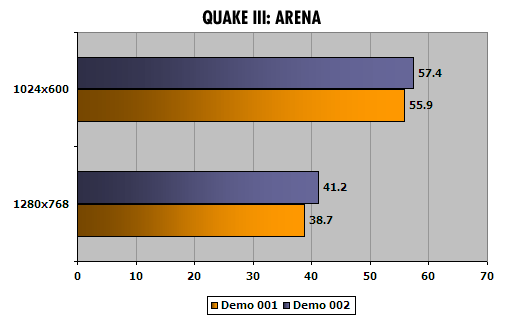
I ran a few tests to demonstrate what you can expect from this chipset.
tr1_quake3.gif

As you can see, Quake 3 performance really isn’t so bad. I ran the program with the default settings so it’s possible to squeeze out more frames per second with a little tweaking. The above benchmarks indicate 32-bit color mode. Running at 16-bit color increases frame rates another 10 frames per second. Also, I only tested with widescreen resolutions since the engine supports it.
tr1_unreal2k3.gif

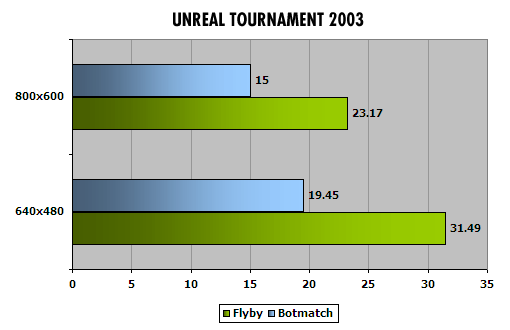
Unreal’s engine is much more demanding and even at 640x480 (with default settings) the gameplay is decent but no spectacular. I played for a while and it was ok but not nearly as fluid and fun as Quake 3.

I also ran a few other games to see how well it plays. I don’t have exact performance numbers for these games but I’ll leave you with some of my observations.

Serious Sam: Second Encounter - performance at 640x480 is pretty good and playable. Anything higher starts to get a little choppy. 800x600 isn’t too bad but 1024x768 is not playable at all.

Neverwinter Nights - You can run this at native resolutions of 1024x600 and 1280x768 but performance might be a little slow. At 1024x600, performance is good once you start playing. It starts out choppy but smooths out once it starts running. You do have to run the game at the “fastest” settings (equating to lowest graphic quality) but the game still looks pretty decent.

Warcraft III - This game plays very well at 800x600 and even at 1024x768. I was pleasantly happy to find this out. 800x600 is the best though and you can play it in 16 or 32-bit color although 16-bit will be better when things get crazy.

If anyone else has good experiences with gaming on their Sony TRs then please share with us the game and how the experience is.

 Signature 

VAIO VGN-Z590N // Core 2 Duo 2.53GHz | 4GB RAM | 200GB 7200 RPM | 802.11a/b/g/n | Bluetooth 2.0
HP TC1100 // 1.1GHz | 1.5GB RAM | 100GB 5400RPM | 802.11a/b/g | Bluetooth 1.2
Daily Gear // Sony Ericsson W910i | iPod nano (1G) 4GB | Panasonic Lumix FX500 Digicam

Profile
 
 
Burn242
Posted: 13 November 2003 01:36 PM   [ Ignore ]   [ # 1 ]  
Embryo
Rank
Total Posts:  18
Joined  2003-11-13

Ok, I was so excited with my TR1A when i got it i had to try my best games, though i cannot give FPS, i will give you a brief discription…

Rise of Nations - Played well, little coppy when i got lots of units, but it played very good on basic settings…

Empire Earth - Plays Great

Command & Conquer Generals - Yeah Right, Not Gonna Happen, Very Very Coppy

Final Fantasy 7 & 8 PC Version, Plays Excellent “Need Update Patches to play”

Delta Force Black hawk Down - Choppy, Somewhat playabe on lowest settings

Command & Conquer Red Alert 2 & Tiberian Sun - Plays Great!


COME ON PEOPLE, LETS HEAR YOU GAME EXPERIENCES!

Profile
 
 
GadgetMan
Posted: 27 December 2003 09:25 PM   [ Ignore ]   [ # 2 ]  
Embryo
Rank
Total Posts:  13
Joined  2003-12-27

tried to play quake 3 on mine, and all I got was “unable to load opengl subsystem”

any ideas?

got directx 9 installed, and latest video drivers

Gadget

Profile
 
 
GadgetMan
Posted: 30 December 2003 11:18 PM   [ Ignore ]   [ # 3 ]  
Embryo
Rank
Total Posts:  13
Joined  2003-12-27

don’t worry… its all good… figured it out now…. and plays fine!!!  just waiting on that extra 512Mb Ram…

Profile
 
 
gr00vy0ne
Posted: 12 January 2004 09:11 AM   [ Ignore ]   [ # 4 ]  
Administrator
Avatar
RankRankRankRankRankRankRankRankRankRankRankRankRankRank
Total Posts:  3264
Joined  2003-10-09

Intel has posted a list of games that are compatible with the 855GM chipset used in the Sony TR1/2/3 notebooks. This is pretty comprehensive so you may want to check there to see if a game can run on the graphics chipset.

http://support.intel.com/support/graphics/gaming/82852.htm

In cases where the game doesn’t work, they provide some basic reasoning why it doesn’t work. If a game requires hardware T&L then it will fail to run on our TRs since the built-in chipset doesn’t have a hardware T&L unit.

 Signature 

VAIO VGN-Z590N // Core 2 Duo 2.53GHz | 4GB RAM | 200GB 7200 RPM | 802.11a/b/g/n | Bluetooth 2.0
HP TC1100 // 1.1GHz | 1.5GB RAM | 100GB 5400RPM | 802.11a/b/g | Bluetooth 1.2
Daily Gear // Sony Ericsson W910i | iPod nano (1G) 4GB | Panasonic Lumix FX500 Digicam

Profile
 
 
zen_vaio
Posted: 12 January 2004 12:49 PM   [ Ignore ]   [ # 5 ]  
Master of Fn Combos
Rank
Total Posts:  132
Joined  2003-12-17

[quote author=“gr00vy0ne”]Intel has posted a list of games that are compatible with the 855GM chipset used in the Sony TR1/2/3 notebooks. This is pretty comprehensive so you may want to check there to see if a game can run on the graphics chipset.

http://support.intel.com/support/graphics/gaming/82852.htm

In cases where the game doesn’t work, they provide some basic reasoning why it doesn’t work. If a game requires hardware T&L then it will fail to run on our TRs since the built-in chipset doesn’t have a hardware T&L unit.


anyone know or have tried to play KOTOR on tr2 ..?

Profile
 
 
gr00vy0ne
Posted: 12 January 2004 01:09 PM   [ Ignore ]   [ # 6 ]  
Administrator
Avatar
RankRankRankRankRankRankRankRankRankRankRankRankRankRank
Total Posts:  3264
Joined  2003-10-09

[quote author=“zen_vaio”]anyone know or have tried to play KOTOR on tr2 ..?

According to the specs of the game (from the website)

Graphics Card: 32 MB OpenGL 1.4 compatible PCI or AGP 3D Hardware Accelerator with Hardware Transform and Lighting (T&L) Capability required

The TR doesn’t have Hardware T&L so this game will most likely not work or not work well. I’ve tried Neverwinter Nights on my TR and it’s barely playable unless you run at the lowest resolution and turn off all graphics options. It uses the same engine (though slightly less demanding) as KOTOR so I think that you won’t have a very good experience playing the game (assuming it will run at all).

 Signature 

VAIO VGN-Z590N // Core 2 Duo 2.53GHz | 4GB RAM | 200GB 7200 RPM | 802.11a/b/g/n | Bluetooth 2.0
HP TC1100 // 1.1GHz | 1.5GB RAM | 100GB 5400RPM | 802.11a/b/g | Bluetooth 1.2
Daily Gear // Sony Ericsson W910i | iPod nano (1G) 4GB | Panasonic Lumix FX500 Digicam

Profile
 
 
gr00vy0ne
Posted: 12 January 2004 01:27 PM   [ Ignore ]   [ # 7 ]  
Administrator
Avatar
RankRankRankRankRankRankRankRankRankRankRankRankRankRank
Total Posts:  3264
Joined  2003-10-09

Ubisoft’s Beyond Good & Evil doesn’t work on the TR. I just tried it.  :(  It’s ok though…i finished it already using my desktop.  LOL

 Signature 

VAIO VGN-Z590N // Core 2 Duo 2.53GHz | 4GB RAM | 200GB 7200 RPM | 802.11a/b/g/n | Bluetooth 2.0
HP TC1100 // 1.1GHz | 1.5GB RAM | 100GB 5400RPM | 802.11a/b/g | Bluetooth 1.2
Daily Gear // Sony Ericsson W910i | iPod nano (1G) 4GB | Panasonic Lumix FX500 Digicam

Profile
 
 
Drachen
Posted: 12 January 2004 03:17 PM   [ Ignore ]   [ # 8 ]  
Geek Extraordinaire
RankRankRankRankRankRankRankRankRankRankRankRankRank
Total Posts:  2298
Joined  2003-10-19

Nobody on this board has probably heard of it, but my favorite RTSs of all time, Freedom Force, works in 1024x768… albeit kind of slowly.

And a big waaaah-TAAAAAH to gr00vy for the :ph34r:

Profile
 
 
gr00vy0ne
Posted: 13 January 2004 12:44 AM   [ Ignore ]   [ # 9 ]  
Administrator
Avatar
RankRankRankRankRankRankRankRankRankRankRankRankRankRank
Total Posts:  3264
Joined  2003-10-09

[quote author=“Anonymous”]Does anyone know whether Icewind Dale II will work on my TR2A?  Thanks.

Yes, it runs fine for me! And I’m only running a TR1AP…so you should have no problem at all.

 Signature 

VAIO VGN-Z590N // Core 2 Duo 2.53GHz | 4GB RAM | 200GB 7200 RPM | 802.11a/b/g/n | Bluetooth 2.0
HP TC1100 // 1.1GHz | 1.5GB RAM | 100GB 5400RPM | 802.11a/b/g | Bluetooth 1.2
Daily Gear // Sony Ericsson W910i | iPod nano (1G) 4GB | Panasonic Lumix FX500 Digicam

Profile
 
 
cellery
Posted: 13 January 2004 02:28 AM   [ Ignore ]   [ # 10 ]  
Subnotebook Savant
RankRankRankRankRank
Total Posts:  548
Joined  2003-10-15

SimCity 4: Yes
KOTOR: No

Profile
 
 
fibrizo
Posted: 13 January 2004 03:59 AM   [ Ignore ]   [ # 11 ]  
Embryo
Rank
Total Posts:  10
Joined  2003-10-26

I for one am running Final Fantasy XI on my TR2 just fine… although I use a 3rd party program to trick the game into thinking I have Hardware T&L by tweaking the bit that’s reported. The game seems to run fine with the program. It wouldn’t run or install even without the tweak. Don’t remember the name of the program off hand though.

Even if this works for you as well, don’t expect awesome performance… It’s a big difference between my athlon XP 2800+ with a radeon 9800 and my Tr2

Profile
 
 
gr00vy0ne
Posted: 13 January 2004 06:31 AM   [ Ignore ]   [ # 12 ]  
Administrator
Avatar
RankRankRankRankRankRankRankRankRankRankRankRankRankRank
Total Posts:  3264
Joined  2003-10-09

[quote author=“fibrizo”]although I use a 3rd party program to trick the game into thinking I have Hardware T&L by tweaking the bit that’s reported.

Any chance you remember what this program is? Or where you got it? I’ve been looking for something like that for a while…but I can’t seem to find anything relevant.

 Signature 

VAIO VGN-Z590N // Core 2 Duo 2.53GHz | 4GB RAM | 200GB 7200 RPM | 802.11a/b/g/n | Bluetooth 2.0
HP TC1100 // 1.1GHz | 1.5GB RAM | 100GB 5400RPM | 802.11a/b/g | Bluetooth 1.2
Daily Gear // Sony Ericsson W910i | iPod nano (1G) 4GB | Panasonic Lumix FX500 Digicam

Profile
 
 
cellery
Posted: 13 January 2004 06:38 AM   [ Ignore ]   [ # 13 ]  
Subnotebook Savant
RankRankRankRankRank
Total Posts:  548
Joined  2003-10-15

I’d be interested in the hack as well, portable gaming is a great way to kill time.

Profile
 
 
gr00vy0ne
Posted: 13 January 2004 06:56 AM   [ Ignore ]   [ # 14 ]  
Administrator
Avatar
RankRankRankRankRankRankRankRankRankRankRankRankRankRank
Total Posts:  3264
Joined  2003-10-09

On an unrelated note…console emulation programs work really great on my TR1. I use Magic Engine (PC-Engine/TurboGFX emulator), SNES9x/ZSNES (SNES Emulator), and NESticle (NES Emulator). All of these run really well and can kill time really easily. I love old school games! Mindless fun!  LOL

snes9x-sample.gif

 Signature 

VAIO VGN-Z590N // Core 2 Duo 2.53GHz | 4GB RAM | 200GB 7200 RPM | 802.11a/b/g/n | Bluetooth 2.0
HP TC1100 // 1.1GHz | 1.5GB RAM | 100GB 5400RPM | 802.11a/b/g | Bluetooth 1.2
Daily Gear // Sony Ericsson W910i | iPod nano (1G) 4GB | Panasonic Lumix FX500 Digicam

Profile
 
 
cellery
Posted: 13 January 2004 07:07 AM   [ Ignore ]   [ # 15 ]  
Subnotebook Savant
RankRankRankRankRank
Total Posts:  548
Joined  2003-10-15

Indeed, I just finished Super Metroid and it brought back a lot of memories. I received a USB game controller for Christmas, so no more sore wrists and cramped fingers!  LOL

Profile


1 of 11
1
2
3
Next
Last »
 
‹‹ StartUp Control Panel: control your startup programs      Customizing your TR ››
Script Executed in 0.7248 seconds
RSS 2.0     Atom Feed
© 2003-2007 siliconpopculture.com

xhtml 1.0 transitional valid!  Creative Commons License  Powered by ExpressionEngine  Add to Technorati Favorites extremeTracking title=

eXTReMe Tracker